AI assistants like Claude are remarkably capable — they can analyse documents, draft contracts, answer complex questions, and reason through problems with impressive accuracy. But until recently, they all shared a fundamental limitation: they operated in isolation, cut off from the tools, databases, and business systems where real work actually happens.
The Model Context Protocol, or MCP, changes that. Developed by Anthropic and released as an open standard in November 2024, MCP gives AI models like Claude a structured way to connect to external systems — from CRM platforms and file storage to legal tools and eSignature solutions. The result is an AI assistant that doesn't just answer questions but actually gets things done.
In Brief:
- MCP (Model Context Protocol): An open-source standard created by Anthropic that defines how AI models connect to external tools and data sources.
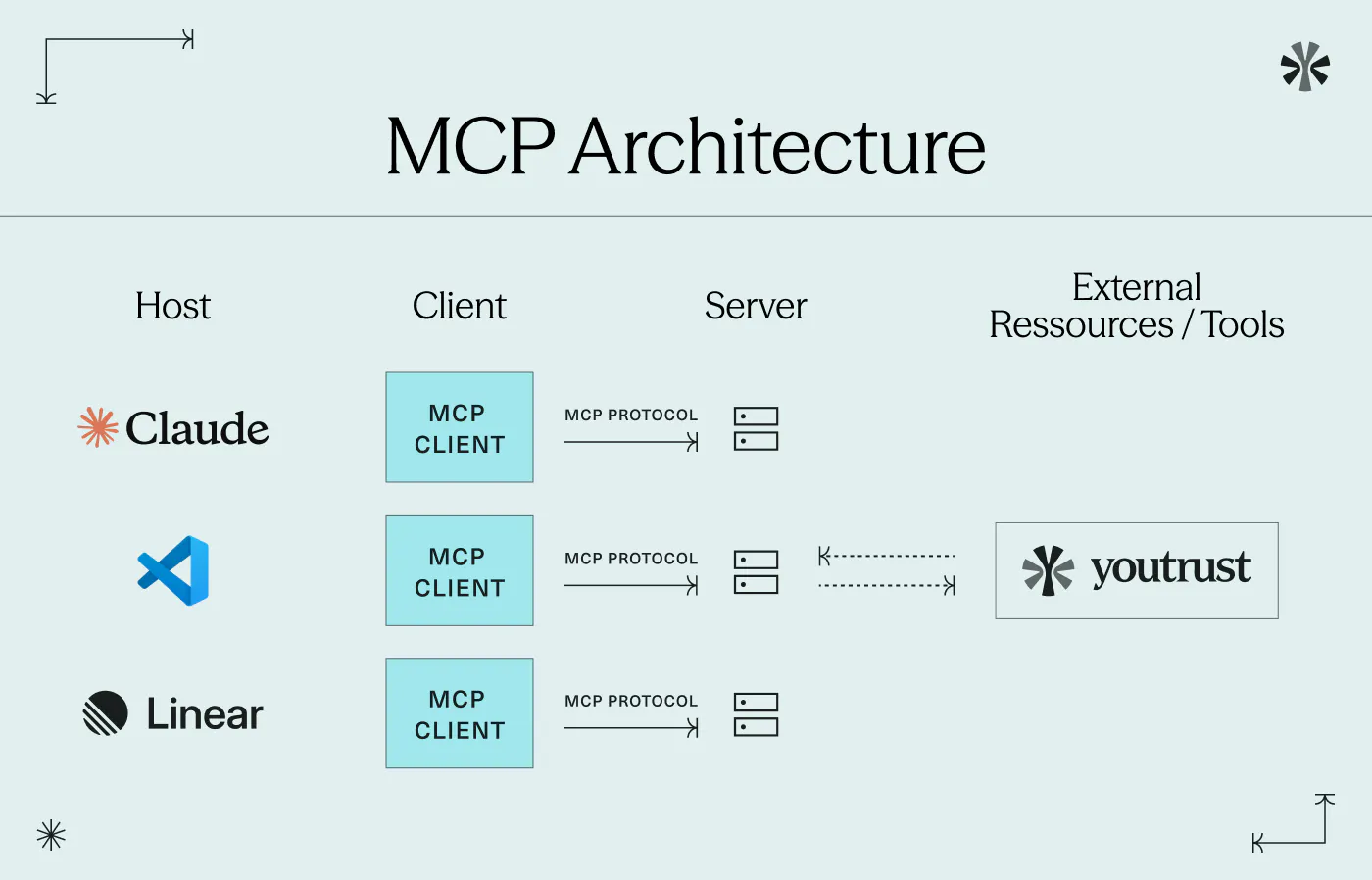
- Architecture: Built on a host–client–server model, where Claude acts as the host, managing requests to external MCP servers.
- Three core primitives: Tools (actions Claude can trigger), resources (data Claude can access), and prompts (reusable instruction templates).
- Native support: Claude Desktop and the Claude API support MCP natively, making integration straightforward for developers and businesses alike.
- Youtrust AI Connector: Youtrust's MCP-enabled connector lets you send signature requests, track contract status, and chase signatories — directly from Claude, with no code required.
What Is the Model Context Protocol?
A universal standard for AI connectivity
Before MCP, connecting an AI model to an external tool required a bespoke integration — built specifically for that model, that tool, and that workflow. Connecting Claude to Google Drive was one project. Connecting it to a CRM was another. Each integration was expensive to build, fragile to maintain, and impossible to reuse across different AI models.
MCP solves this by providing a single, standardised interface. Instead of building a custom connector for every tool, developers publish an MCP server that exposes their product's capabilities according to a common specification. Any MCP-compatible AI — Claude, but also other models that adopt the standard — can then connect to that server without additional development work.
Think of MCP as a universal adapter — like USB-C for AI. Rather than a different cable for every device, one standard connector works across everything.
MCP is an open standard that enables developers to build secure, two-way connections between their data sources and AI-powered tools.
MCP vs traditional integrations
The difference becomes clear when you compare the two approaches side by side:
/ | Traditional integration | With MCP |
|---|---|---|
Development effort | Custom-built for each tool | One standard, reused everywhere |
Maintenance | Fragmented, tool by tool | Centralised |
Interoperability | Low — tied to one AI model | High — works across MCP-compatible models |
Time to deploy | Weeks to months | Days |
Technical barrier | High | Reduced |
How Does MCP Work?
The host, client, and server architecture
MCP organises the connection between Claude and external tools around three components:
- The MCP host is the application running Claude — such as Claude Desktop or an enterprise platform embedding the Claude API. The host orchestrates the overall process and decides which MCP servers to query.
- The MCP client is a module inside the host that manages individual connections to MCP servers. Each server gets its own dedicated client session, keeping connections clean and isolated.
- The MCP server is a programme that exposes the capabilities of an external tool or data source. An MCP server for a CRM, for instance, might expose the ability to search contact records, create new entries, or retrieve contract histories.
In practice, this is how a typical interaction unfolds: a user tells Claude to "send the NDA to Sarah for signature". Claude identifies the relevant tool (the Youtrust MCP server), sends a structured request via its MCP client, and the server executes the action in the target application. Claude then confirms the result — all without the user leaving their AI interface.
Tools, resources, and prompts
Every MCP server exposes its capabilities through three fundamental building blocks:
- Tools — actions the AI can trigger: sending a document, calling an API, executing a database query. These are the "doing" elements.
- Resources — data the AI can read: files, records, document lists, contract statuses. These are the "knowing" elements.
- Prompts — reusable instruction templates that guide Claude's behaviour for common tasks within a given integration.
This structured approach gives businesses precise control over what Claude can and cannot do within each connected system — an important consideration when working with sensitive contracts or regulated data.
Claude's Native Support for MCP
Claude Desktop and MCP servers
Claude Desktop — Anthropic's desktop application — supports MCP out of the box. Users can install MCP servers locally and configure Claude to access them directly from the settings. Once connected, Claude can interact with those tools in any conversation, without any additional setup per session.
For businesses using Claude through the API, MCP support is equally accessible. Developers can configure MCP servers alongside their Claude API integration, giving their applications the same connectivity without rebuilding the underlying logic.
Good to know
The MCP ecosystem has grown rapidly since its launch. OpenAI, Google DeepMind, and Microsoft have all formally adopted the standard — making MCP the de facto protocol for connecting AI to the real world. Claude users benefit from this momentum directly, as every new MCP server becomes available to any compatible AI.
Security and permissions in MCP
One of the design priorities of MCP is security. Each MCP server operates within a defined scope — it only exposes the specific tools and resources its developer has chosen to make available. Claude cannot access anything beyond what the server explicitly permits.
For remote MCP servers, authentication is handled via OAuth — the same secure delegated access mechanism used by most modern SaaS platforms. Users authorise the connection once, and Claude acts only within their existing permissions in the connected system. For local MCP server connections, such as those used in Claude Desktop, communication is managed through secure local processes that remain entirely on your machine. In both cases, no new access rights are created and no backdoors are opened.
Good to know
MCP connections are permission-bound by design. Claude can only see and act on what the MCP server explicitly exposes, within the scope the user has authorised. It is structurally impossible for the AI to access data outside that defined perimeter.
Real-World Applications for Businesses
For business teams, MCP transforms Claude from a capable assistant into an active participant in daily workflows. The most immediate applications involve document-heavy processes where speed and accuracy matter.
Contract and signature workflows are a natural starting point. Legal, sales, and HR teams spend significant time chasing signatures, checking contract statuses, and coordinating approvals. With MCP-enabled tools, Claude can handle these tasks on instruction — sending documents, tracking progress, following up with signatories — all from the AI interface.
AI contract management is evolving rapidly, and MCP is a key reason why: it allows AI to move beyond analysis and into execution, handling the operational steps that previously required switching between multiple platforms.
CRM and data workflows follow a similar pattern. Rather than querying a CRM manually, team members can ask Claude to retrieve account information, update records, or generate summaries — tasks that MCP-connected servers can execute directly.
Connect Youtrust to Claude with the AI Connector
Youtrust's AI Connector is a practical example of MCP applied to electronic signature. It connects your Youtrust account to Claude using the MCP standard, making it possible to manage your signing workflows directly from your AI assistant — without leaving the interface, without writing code, and without any additional cost on paid plans.
How to use Youtrust with Claude
1 Activate the AI Connector
Available in your Youtrust account settings, on all paid plans. No code required.
2 Authorise the connection
A standard OAuth flow links your Youtrust account to your AI assistant. Claude will only act within your existing permissions.
3 Start working in plain language
Ask Claude to send a document for signature, check a pending contract's status, or follow up with a signatory. Youtrust executes the action; Claude confirms the result.
Behind the conversational interface, Youtrust remains the legal and security backbone: eIDAS-compliant electronic signatures, a complete audit trail, required authentication at every connection, and no change to existing user permissions. Claude handles the interaction; Youtrust ensures the legal integrity of every signature.
For teams already using the electronic signature API for high-volume automated workflows, the AI Connector offers a complementary layer — enabling ad hoc, user-driven actions through natural language without replacing the existing automation infrastructure.
Try Youtrust for free
Connect your electronic signature workflows to Claude — no code, no extra cost.

Conclusion
MCP marks a genuine shift in how AI integrates with business tools. By establishing a single, open standard for connectivity, it removes the friction that previously kept AI assistants confined to a conversational layer — separate from the systems where work actually gets done. For teams dealing with contracts, approvals, and document workflows, the practical implications are immediate: Claude can now act, not just advise.
As the MCP ecosystem continues to expand, the range of tools and workflows an AI can participate in will only grow. The question for businesses is no longer whether to connect AI to their operations — but how quickly.
Ready to connect your workflows to AI?
Youtrust's AI Connector brings electronic signature into Claude — securely, legally, and in plain language.
Frequently Asked Questions
Is MCP specific to Claude?
No. MCP is an open standard published by Anthropic but designed for broad adoption. OpenAI, Google DeepMind, and Microsoft have all formally adopted it. Claude was the first major model to support it natively, but it is not the only one.
Do I need technical skills to use Claude with MCP?
It depends on the integration. For MCP servers like Youtrust's AI Connector, setup requires no coding — a standard OAuth authorisation is all that's needed. Building custom MCP servers does require technical knowledge.
What is the difference between MCP and a traditional API?
An API is a connection point between two systems. MCP is a protocol layer that standardises how an AI model discovers and uses those connection points. Rather than replacing APIs, MCP builds on top of them — giving AI a consistent way to interact with tools without custom integration code for each one.
Is MCP secure for sensitive business documents?
Yes. MCP connections are scoped and permission-bound — Claude can only access what the MCP server explicitly makes available, within the authorisation granted by the user. For Youtrust, the AI Connector respects all existing permissions, and every signature action maintains the full legal and security guarantees of the platform.
Which Claude plans support MCP?
MCP is available through Claude Desktop (free and paid plans) and the Claude API. For business deployments via the API, Anthropic's documentation provides full technical guidance on configuring MCP server connections.