Electronic signature platforms have transformed how businesses handle contracts. But one friction point has remained: you still need to leave your workflow, open another application, and manage the process manually. The Model Context Protocol (MCP) removes that step entirely.
MCP allows AI assistants to connect directly to business tools — including electronic signature platforms — and execute actions through plain-language instructions. For teams that already work inside Claude, ChatGPT, or Vibe by Mistral, this changes how contracts get signed.
This article explains what MCP electronic signatures are, what concrete benefits they bring, and how to get started without any technical knowledge.
In brief:
- MCP (Model Context Protocol): An open standard that lets AI assistants connect to business tools and trigger real-world actions using natural language.
- Core benefit: Send signature requests, check contract status, and follow up with signatories directly from your AI assistant — without switching applications.
- No technical setup: Connecting via MCP requires only an OAuth authorisation. No code, no API key, no developer involvement.
- Legal compliance maintained: Every signature initiated via MCP through Youtrust preserves the full eIDAS-compliant audit trail, with your existing user permissions enforced at every step.
- Youtrust AI Connector: Youtrust's native MCP server is available on all Youtrust plans, compatible with Claude, ChatGPT, and Vibe by Mistral.
What Is MCP? The Protocol Connecting AI to Your Business Tools
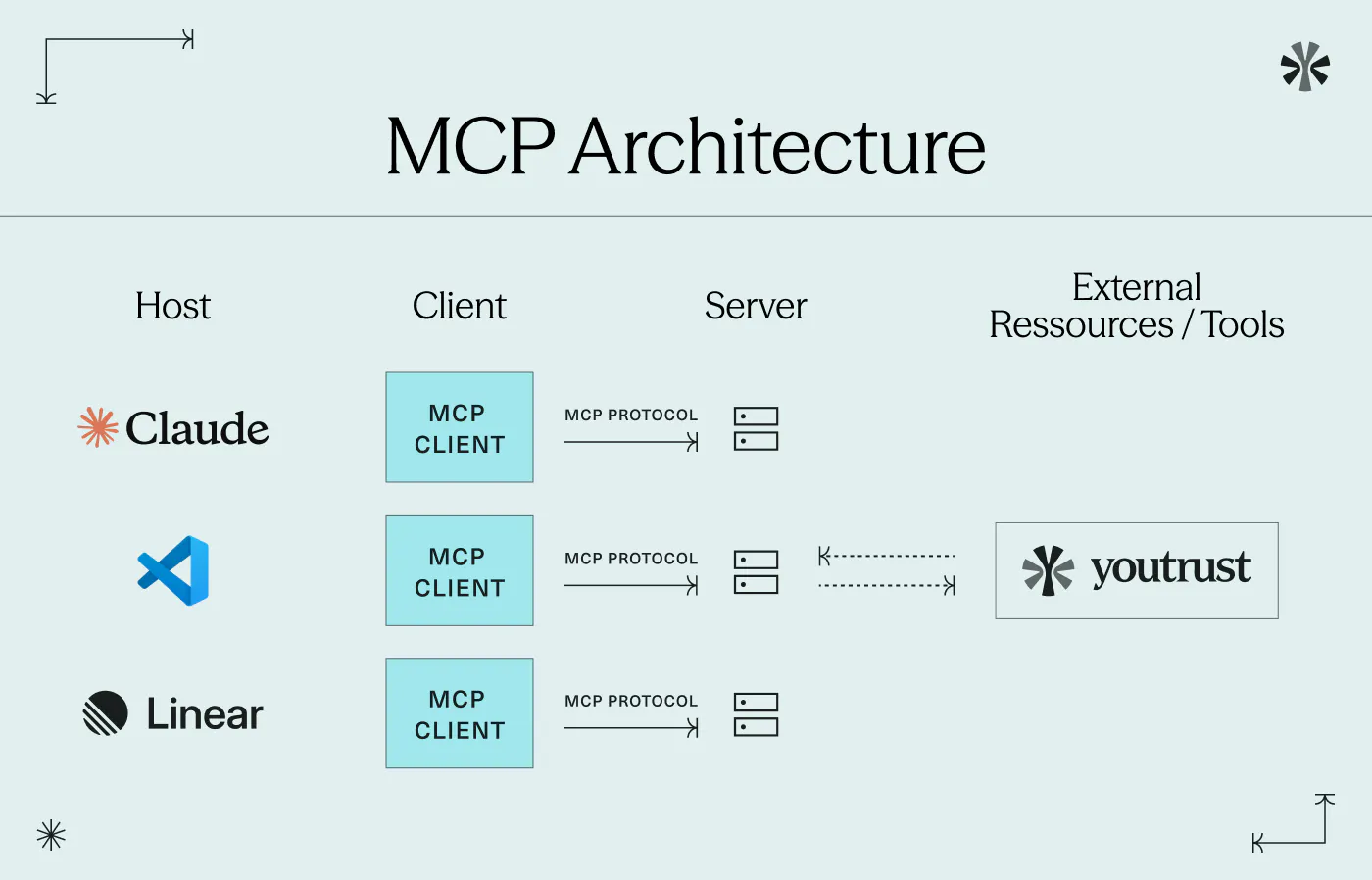
The Model Context Protocol (MCP) is an open standard developed by Anthropic and adopted across the AI industry. Its goal is straightforward: provide a standardised way for AI assistants to connect to external tools and perform actions within them.
Think of MCP as a universal plug for AI — similar to how USB-C gives you a single interface for any compatible device. With MCP, any compatible AI assistant can connect to any compatible business application and carry out tasks on your behalf.
From Text Generation to Real-World Action
Until recently, AI assistants were limited to generating content. They could draft a contract, summarise a document, or suggest edits — but they could not send anything, update a status, or trigger a workflow. They remained confined to the conversation window.
MCP changes this boundary. When an AI assistant is connected to a business tool via an MCP server, it can execute actions in response to natural language instructions. For electronic signatures, this means: send a contract, check who has signed, and follow up with those who haven't — all from a single prompt.
The Rise of Agentic AI: Why MCP Matters Now
MCP is the technical infrastructure behind what is increasingly called agentic AI — AI systems that don't just respond but actively act within existing business environments. According to Gartner (June 2025), 33% of enterprise software applications will include agentic AI by 2028, compared to less than 1% in 2024.
Contract management is one of the most natural areas of application. Signature workflows are repetitive, multi-step, and time-sensitive — exactly the kind of process that agentic AI can handle efficiently.
The Key Benefits of MCP Electronic Signatures
Send and Track Contracts Without Leaving Your AI Assistant
The most immediate benefit is the elimination of context switching. A standard signature request today typically involves opening your signature platform, selecting or uploading a document, entering signatories, configuring reminders, and then tracking completion separately.
With MCP, this entire process collapses into a single instruction:
"Send the NDA to John at Acme Corp. Remind him tomorrow if he hasn't signed."
Your AI assistant interprets the instruction, selects the appropriate tool, and executes the action in your signature platform. You remain in your conversation. The platform handles the process. For teams managing multiple contracts at once, the cumulative time saving is significant — and the reduction in mental load is equally valuable.
Connect Youtrust to your AI assistant for a headless eSignature experience
No Technical Setup — Open to Every Business User
Traditional API integrations require developer resources: authentication tokens, endpoint configuration, error handling, and ongoing maintenance. This creates a practical barrier for most business users.
MCP removes this barrier entirely. Connecting your AI assistant to Youtrust takes a few minutes and requires nothing beyond an OAuth authorisation — the same single-click login flow you use when signing into an app with your Google or Microsoft account. No code. No API key. No IT ticket. The connection is designed for lawyers, HR managers, finance directors, and business owners — not developers.
Good to know
The OAuth authorisation between your AI assistant and Youtrust is a one-time setup. Once connected, you do not need to repeat the process. You can revoke access at any time from your Youtrust account settings.
Legal Validity Preserved at Every Step
One legitimate concern with AI-triggered actions is whether legal compliance is maintained. With MCP electronic signatures through Youtrust, the answer is clear: it is.
Every action performed via the Youtrust AI Connector respects your existing Youtrust permissions. If you do not have the right to send a signature request on behalf of a colleague, the AI cannot do it either. Your existing role-based access controls remain fully enforced.
Under Regulation (EU) No 910/2014 — known as eIDAS — qualified trust service providers are required to maintain a complete, verifiable record of each signature transaction. Every signature initiated through Youtrust's AI Connector preserves this full audit trail — recording who initiated the request, when, and under what authentication conditions. The AI manages the interaction; Youtrust guarantees the legal integrity of each signature.
Shorter Signature Cycles, Less Manual Follow-Up
Contracts pending signature create bottlenecks. Deals stall. Renewals lapse. Projects wait.
MCP electronic signatures address this in two ways. First, initiating a request takes seconds rather than the several minutes needed to navigate a separate application. Second, you can identify and follow up on outstanding signatures in a single prompt:
"Which contracts have been pending for more than five days? Send a reminder to each signatory."
No dashboard to open. No records to filter. No individual follow-ups to send manually.
MCP Electronic Signatures in Practice: Real-World Use Cases
User Profile | Situation | Natural Language Instruction |
|---|---|---|
Legal Manager | NDA before a client call | "Send the NDA template to Sarah at Fournier Group. Remind her tomorrow morning." |
HR Director | New hire onboarding | "Send the employment contract to our new designer and let me know when it's signed." |
Finance Director | Supplier contract follow-up | "Which supplier agreements are still unsigned? Send a reminder to each contact." |
SME Owner | Freelance contract dispatch | "Send the freelance agreement to Marc. Use the standard template." |
Office Manager | Lease renewal | "Send the office lease renewal to our landlord and track the status." |
How Youtrust's AI Connector Works
Youtrust's AI Connector is a native MCP server designed specifically for electronic signatures. It connects your Youtrust account directly to Claude, ChatGPT, Vibe by Mistral, or any MCP-compatible AI assistant — and requires no technical expertise to set up.
Three Steps to Start Signing via MCP
How to connect Youtrust to your AI assistant
1 Activate the OAuth connection
In your Youtrust account, go to AI Connector settings and authorise the connection with your preferred AI assistant. Takes under five minutes.
2 Write your instruction
In Claude, ChatGPT, or Vibe by Mistral, type your request in plain English. No commands, no syntax, no structure required.
3 Your assistant acts
The AI selects the right tool, executes the action in Youtrust, and confirms the result. You stay in your AI interface throughout.
The Youtrust AI Connector is available on all Youtrust plans — no upgrade required to access it.
Try Youtrust AI Connector
Connect your AI assistant to Youtrust in minutes.

MCP vs. API: Which Integration Is Right for You?
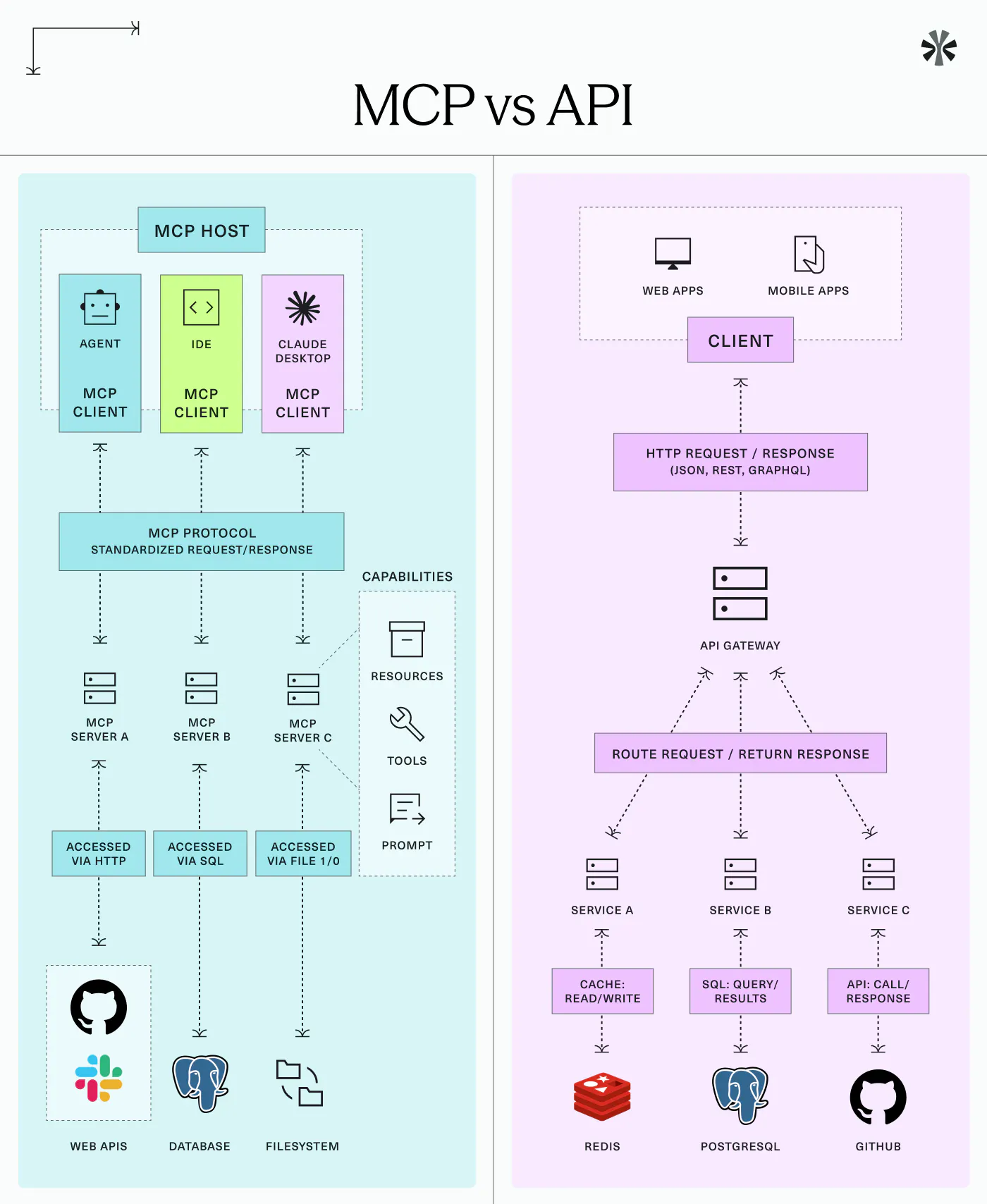
MCP and API integrations serve different needs. The table below clarifies when each approach applies — and why most businesses will benefit from both over time.
Criteria | MCP (AI Connector) | API Integration |
|---|---|---|
Target user | Business user — no technical skills needed | Developer |
Setup time | Minutes (OAuth authorisation) | Days to weeks (development) |
Ideal use case | Ad hoc, conversational requests | High-volume automated workflows |
Interaction model | Natural language instructions | Programmatic control |
Cost | Included in all plans | Usage-based |
eIDAS compliance | Full audit trail preserved | Full audit trail preserved |
Is MCP Electronic Signature the Right Fit for Your Business?
MCP is the right approach when your team already works inside an AI assistant, when you want non-technical users to manage signature workflows independently, and when your use cases are conversational and ad hoc — sending individual documents, checking status, or sending targeted reminders.
If you process thousands of documents per day through automated, system-driven triggers, a dedicated API integration remains the appropriate infrastructure. For everyone else — legal professionals, HR teams, finance managers, and business owners — MCP electronic signatures offer the most direct, accessible, and legally compliant path to faster contract workflows.
Important
MCP is optimised for conversational, on-demand interactions. It is not designed to replace batch processing or high-volume automated pipelines. For mission-critical workflows running at scale, the Youtrust API remains the recommended approach.
Conclusion
MCP electronic signatures represent a genuine shift in how contracts get handled — not a marginal improvement, but a fundamental change in where signature workflows live. By embedding the signature process directly into the AI tools your teams already use, MCP eliminates the friction that slows down deals, onboarding, and renewals.
For businesses looking to move faster without adding complexity, Youtrust's AI Connector is the most accessible entry point: no code, full eIDAS compliance, and compatibility with the leading AI assistants available today.
Send, track, and follow up on contracts from your AI assistant.
FAQ
What does MCP stand for in electronic signatures?
MCP stands for Model Context Protocol, an open standard that lets AI assistants connect to tools like Youtrust and trigger real-world actions — such as sending or tracking contracts — through natural language.
Is an electronic signature triggered via MCP legally valid?
Yes. Signatures initiated through Youtrust's AI Connector are fully eIDAS-compliant. A complete audit trail is generated for each request, and your existing user permissions are enforced throughout.
Which AI assistants work with Youtrust's AI Connector?
Youtrust's AI Connector is compatible with Claude (Anthropic), ChatGPT (OpenAI), and Vibe by Mistral — with more platforms coming soon. Compatibility with Mistral is a key advantage for European businesses.
Do I need a developer to set up MCP electronic signatures?
No. The Youtrust AI Connector connects via OAuth — a simple one-time authorisation, similar to signing in with your Google account. No code to write, no API key to manage.
Is the Youtrust AI Connector included in my plan?
Yes. It is available on all Youtrust plans. Check your plan page or contact us to confirm access details.