AI assistants are no longer just answering questions. They're expected to take actions, retrieve live data, and operate inside the systems your business depends on every day. But making that happen — reliably, securely, at scale — requires a shared language between AI models and the outside world.
That shared language is the Model Context Protocol (MCP).
Launched in late 2024, MCP is fast becoming the universal standard for connecting large language models to external tools, databases, and services. This guide explains what MCP is, how it works, what distinguishes it from traditional APIs, and why it matters for business teams looking to get more from their AI.
Summary in Brief
- Definition: MCP is an open source protocol that standardises how AI models communicate with external tools and data sources.
- Creator: Anthropic published it on 25 November 2024; it has since been adopted across the AI ecosystem.
- Architecture: Based on a client-server model — the AI assistant sends requests through MCP clients to MCP servers that expose tools and resources.
- Key benefit: Replaces custom, one-off integrations with a universal connection layer, reducing development effort and improving cross-model interoperability.
- Business impact: Enables AI agents to take real actions — sending contracts, querying databases, updating CRM records — directly from a prompt.
What Is the Model Context Protocol?
The Model Context Protocol (MCP) is an open source communication protocol that defines a standardised interface between a large language model (LLM) and external systems — databases, business APIs, cloud services, or local files.
Before MCP existed, every integration between an AI assistant and an external tool required custom development: a proprietary connector built from scratch for that specific model and that specific tool. These integrations were costly to build, difficult to maintain, and incompatible with any other AI.
MCP replaces this patchwork approach with a universal standard. Any LLM that supports MCP can connect to any MCP-compatible server — without rebuilding the integration from scratch each time.
The problem MCP was designed to solve
AI language models have always been highly capable at reasoning, summarising, and generating content. But they have historically been isolated from the systems businesses actually run on. A model might know how to draft a contract, but it could not send it for signature or verify whether it had been signed — unless a developer manually coded a specific connection.
MCP changes this by giving AI models a structured, consistent way to interact with any external system, in real time, without human intervention at each step.
Open source and industry-backed
MCP was created and published by Anthropic on 25 November 2024. The protocol is fully open source, and it has attracted significant contributions from the broader AI community. Microsoft, Google, and other major players across the AI industry have publicly expressed support for the standard — an unusually broad alignment that points to MCP becoming the de facto protocol for agentic AI integration.
Good to know
MCP is model-agnostic by design. Claude, ChatGPT, Gemini, and Mistral all support MCP — either natively or through their developer APIs. Any tool that builds an MCP server becomes accessible to every compatible AI assistant at once.
How MCP Works: The Architecture Explained
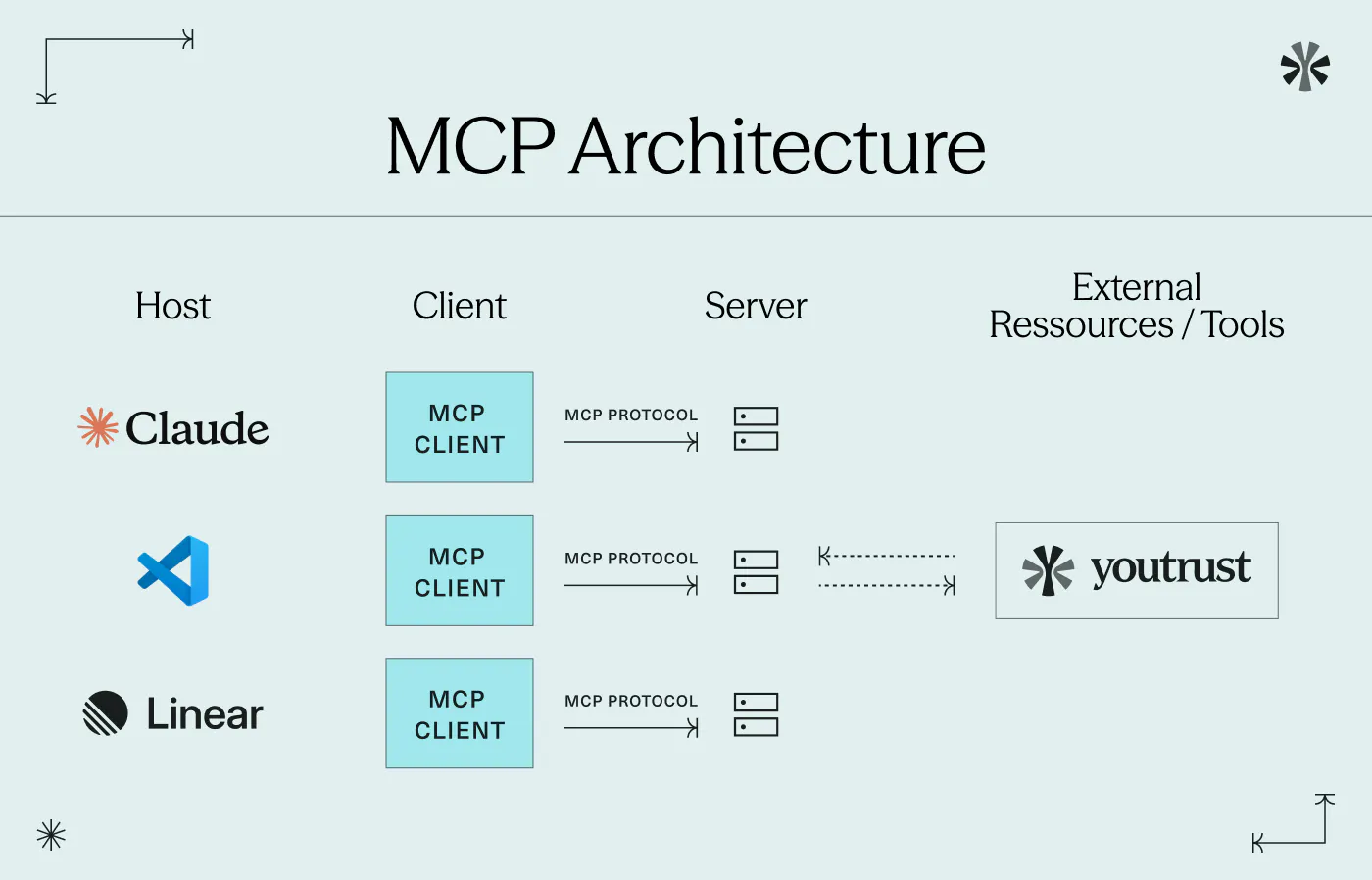
MCP is built on a client-server architecture with three distinct components: the host, the client, and the server.
- MCP host: The AI application the user interacts with — Claude, ChatGPT, a custom enterprise chatbot, or an AI-powered product.
- MCP client: The component embedded within the host that formulates and sends structured requests to external servers.
- MCP server: The external system that exposes tools (actions the AI can perform, like sending a document) and resources (data the AI can retrieve, like a list of pending requests).
What happens when you send a prompt
When a user types an instruction — for example, "Send the NDA to Sarah and check whether the services agreement has been signed" — here is what happens:
- The AI host interprets the instruction and identifies the relevant actions needed.
- The MCP client formulates structured requests using JSON-RPC 2.0 (the communication format MCP relies on).
- The MCP server receives those requests, executes the actions — sending the document, querying the signature status — and returns structured results.
- The AI host synthesises the results and presents a clear summary to the user.
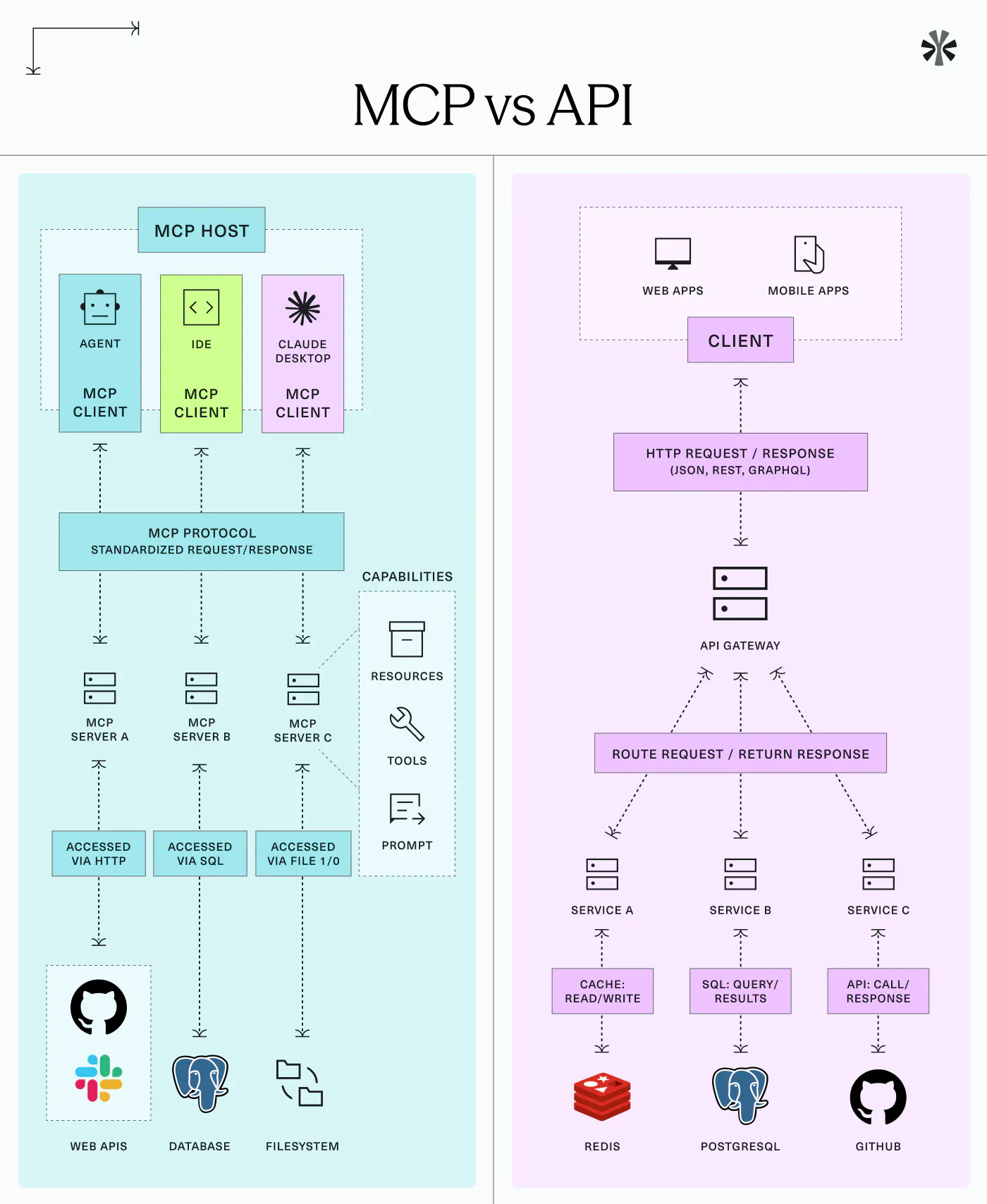
Unlike a traditional API — where a developer must anticipate every possible call in advance — MCP allows the AI to dynamically discover what a server is capable of and adapt its behaviour accordingly. This makes MCP far more flexible in practice.
MCP vs Traditional API — Key Differences
/ | Traditional API | Model Context Protocol (MCP) |
|---|---|---|
Purpose | Exposes specific functionality of one service | Defines a universal AI-to-tool connection layer |
Integration effort | Custom development required per tool and per model | One server build, reusable across all MCP-compatible models |
Flexibility | Rigid, pre-defined endpoints | Dynamic capability discovery at runtime |
Model compatibility | Model-specific | Works with any MCP-compatible LLM |
Orchestration | Developer-managed logic | AI-managed, based on user intent |
A useful analogy: a traditional API is like a proprietary cable — it connects two specific systems. MCP is the USB-C equivalent: a universal connector that works with any compatible device, regardless of manufacturer.
Concrete Business Use Cases for MCP
MCP is already being applied across industries. Here are the most common enterprise scenarios.
Contract and document lifecycle management
An AI agent connected via MCP to a contract platform can send a document for signature, check its status, and trigger follow-up reminders — all from a single prompt, without switching between tools or logging into a separate interface.
Customer support augmentation
An AI assistant connected via MCP to a CRM can retrieve a customer's full history, update their record, and draft a contextualised response — in one workflow, triggered by a single natural language instruction.
Real-time financial reporting
A finance team's AI assistant can query an internal database on demand to detect anomalies, generate management summaries, or surface budget deviations — using live data rather than static exports.
Retrieval-Augmented Generation (RAG)
MCP simplifies the retrieval step in RAG architectures. Instead of relying on static knowledge bases, the model queries live, authoritative data sources at the exact moment of generation — making outputs more accurate and more current.
According to Gartner (June 2025), 33% of enterprise software applications will include agentic AI capabilities by 2028, up from less than 1% in 2024. MCP is the protocol making those integrations interoperable.
Is MCP Secure for Enterprise Use?
Security is a legitimate concern when connecting AI models to live business systems. MCP addresses this through several built-in mechanisms:
- Access control: MCP servers expose only the tools and resources they are explicitly configured to share. The model never has unrestricted access to the underlying system.
- Authorisation scoping: Permissions are granular. A server can be configured to allow read-only queries, block write or deletion operations, or restrict access to specific datasets.
- Minimal data transfer: Only the results of authorised queries are transmitted to the model — not raw data dumps or full system access.
Businesses retain complete control over what their MCP servers expose. Deployment can be local (on-premises) or cloud-based, depending on data residency and compliance requirements.
Important
When evaluating any MCP deployment, always verify that the server provider meets your organisation's data governance and compliance standards — including GDPR, ISO 27001, and any sector-specific regulations.
How Youtrust Connects to Your AI Agent via MCP
Youtrust offers a native MCP server — the AI Connector — that allows you to integrate your electronic signature workflows directly into AI assistants such as Claude, ChatGPT, or Mistral.
Once connected, your AI assistant can:
- Send a contract for signature by specifying the document and recipient in a prompt
- Check the status of a pending signature in real time, without accessing the platform directly
- Track invitations and follow up on outstanding requests
All of this happens within the AI interface — no tab switching, no manual uploads, no development work required on your end. Crucially, the entire workflow remains backed by Youtrust's eIDAS-compliant trust layer, meaning every signature retains its legal validity under EU regulation — at the signature level corresponding to the chosen workflow.
How to connect Youtrust to your AI agent
1 Create your Youtrust account
Sign up at youtrust.com/signup and access your dashboard. No technical setup required.
2 Enable the AI Connector
In your account settings, activate the AI Connector to generate your MCP server credentials.
3 Connect to your AI assistant
Paste the MCP server URL into your AI assistant's settings (Claude, ChatGPT, Mistral). Your assistant is now ready.
Try Youtrust for free
Connect your AI agent to your electronic signature workflows in minutes.

Conclusion
The Model Context Protocol is reshaping how AI systems interact with the tools and data businesses rely on. By standardising the connection layer between models and external services, MCP makes agentic AI practical, portable, and secure at enterprise scale. For teams already using AI assistants, adopting MCP-compatible integrations — like Youtrust's AI Connector — is the fastest path to turning AI from a conversational tool into a genuine workflow engine.
Ready to connect your AI agent to your signature workflows?
FAQ
Who created the Model Context Protocol?
MCP was created by Anthropic and published on 25 November 2024 as an open source project. It has since been adopted by major players across the AI industry, including Microsoft and Google.
Which AI assistants support MCP?
MCP is model-agnostic. Claude, ChatGPT (via Developer Mode), Gemini, and Mistral all support MCP clients through their developer APIs. A growing ecosystem of enterprise platforms is also adopting the standard.
Do I need to be a developer to use an MCP tool?
To build an MCP server, some development knowledge helps. To use a ready-made product like Youtrust's AI Connector, no technical skills are needed — setup takes only a few minutes.
What is the difference between MCP and function calling?
Function calling is model-specific. MCP is a cross-model protocol: any compatible AI can connect to any compatible server. It is broader, more portable, and not tied to any single provider.
Is MCP appropriate for regulated industries?
Yes, with correct configuration. Access controls and authorisation scoping make MCP viable for finance, healthcare, and legal sectors. Youtrust's AI Connector maintains full eIDAS compliance throughout.