For years, connecting one business tool to another meant one thing: calling in your development team, writing integration code, and waiting weeks for results. Then AI assistants became the primary interface through which millions of professionals access information and take action. And with them, a new integration standard emerged: MCP, the Model Context Protocol.
Today, when planning an integration project, the question has shifted. It's no longer simply "how do we connect these systems?" — it's "should we use a classic API or MCP?" Both approaches are valid, address different needs, and suit very different profiles. Here's how to tell them apart and choose the right one for your situation.
Summary in Brief
- API (Application Programming Interface) defines a fixed contract between two systems, requiring developer code to trigger specific actions — ideal for high-volume, automated workflows.
- MCP (Model Context Protocol), published by Anthropic in November 2024, is an open protocol that lets AI assistants interact with your tools using natural language instructions — no code required.
- These two approaches are complementary, not competing: APIs handle machine-to-machine automation at scale; MCP enables AI agents to act conversationally on your behalf.
- By 2028, 33% of enterprise software applications will embed agentic AI capabilities, up from less than 1% in 2024 (Gartner, June 2025).
- In practice: Youtrust's AI Connector uses MCP to let Claude, ChatGPT, or Vibe by Mistral send electronic signature requests directly from your AI assistant — no code, no API keys.
What Is an API? The Foundation of Software Integration
An API — Application Programming Interface — has been the backbone of software integration for decades. It defines a precise set of rules and endpoints that allow one system to call the functions of another in a structured, predictable way.
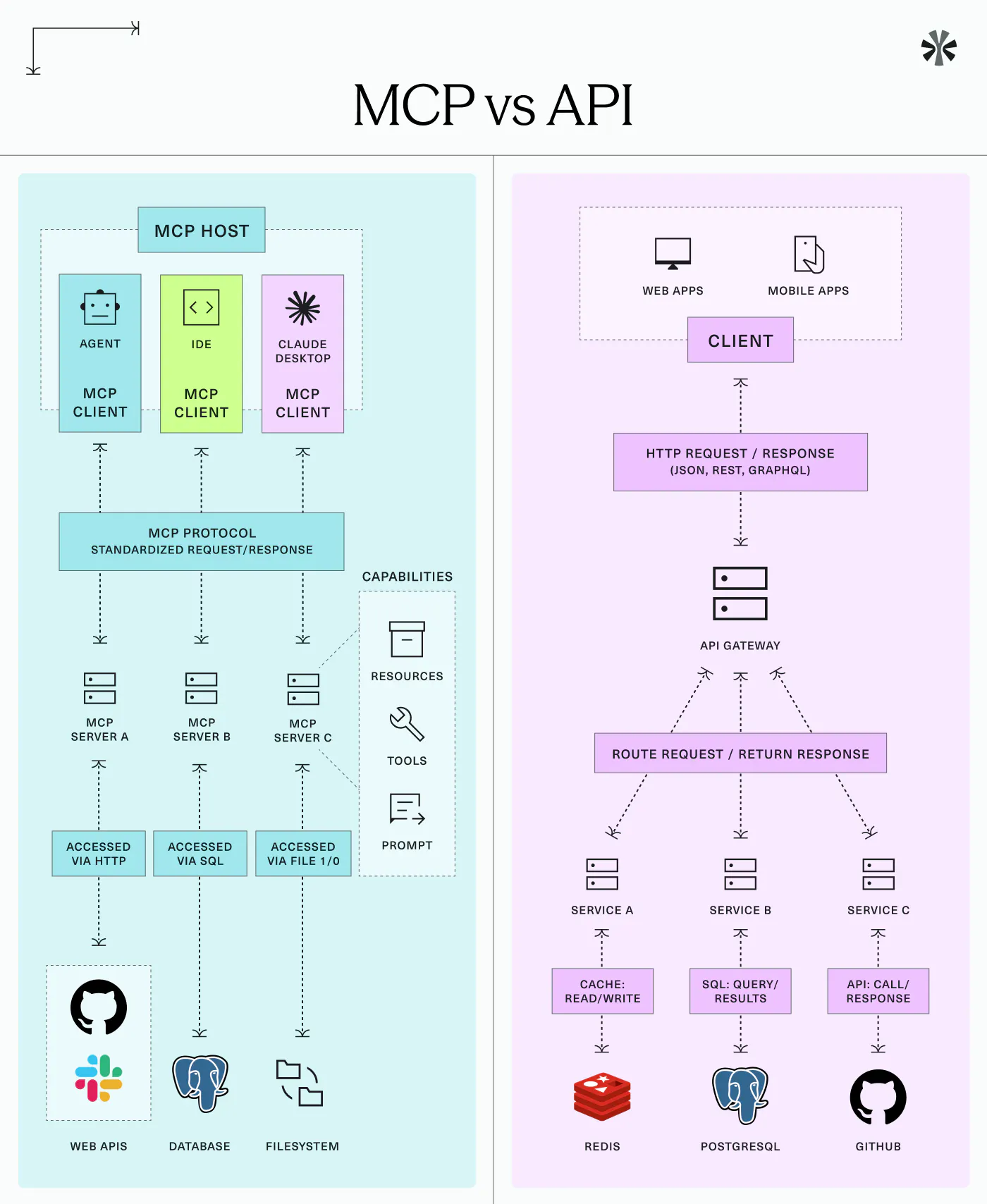
Think of an API as a contract between two machines. It specifies exactly which operations are available, what parameters to send, and what format the response will take. Developers write code to exploit these endpoints, build automated workflows, and connect applications together.
How does an API work?
The mechanics are straightforward: System A sends a formatted request to System B, specifying the desired action and the data it needs. System B processes that request and returns a structured response. Everything is deterministic — the developer knows precisely what will happen before it happens.
A typical example: a payroll platform calls an HR software API every time an employee contract is validated, automatically triggering an onboarding sequence — no human intervention, no interface switching, at any volume.
When is an API the right choice?
An API is the reference solution when:
- You have a developer team capable of building and maintaining the integration
- Your workflows are repetitive, high-volume, and defined in advance
- You need precise, granular control over each step of the process
- The integration should run invisibly in the background for end users
- Scalability and performance are top priorities
Good to know
REST APIs have become the dominant standard for web integrations over the past decade, offering predictability, reliability, and extensive tooling across all major programming languages.
What Is MCP (Model Context Protocol)?
The Model Context Protocol is an open protocol, published by Anthropic on 25 November 2024, designed to standardise how AI assistants interact with external tools and data sources. Its goal: allow any compatible AI model to understand what an application can do — and act on it through simple, natural-language instruction.
MCP is frequently compared to a "universal USB-C port for AI agents." Just as USB-C eliminated the need for device-specific cables, MCP eliminates the need for custom, one-off integrations every time an AI agent needs to access a new tool. Any model that supports MCP can connect to any MCP-compatible server — without rebuilding the integration from scratch.
How MCP works: a three-layer architecture
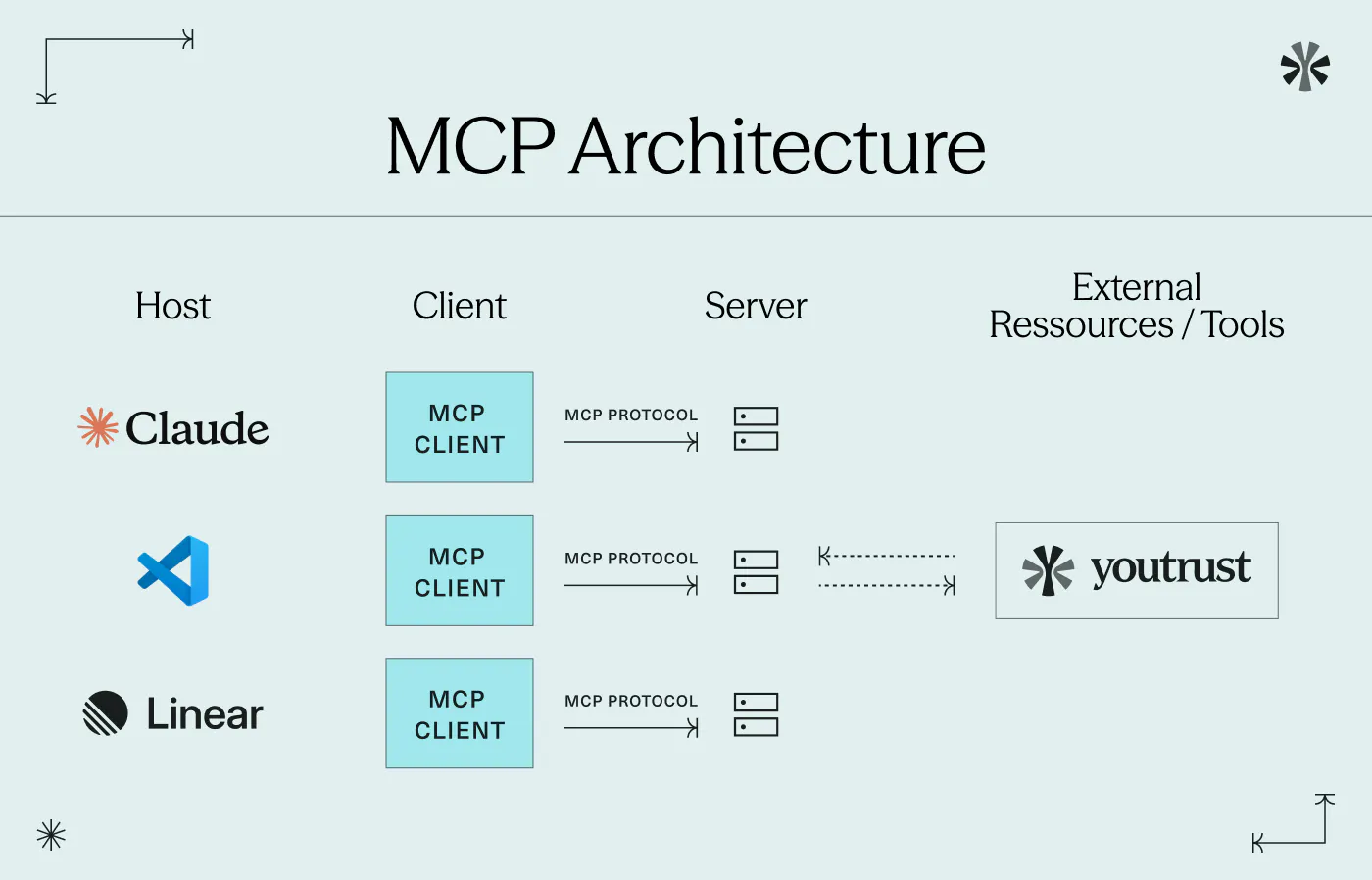
MCP follows a client-server structure with three core components:
- The MCP host: the AI assistant or application the user interacts with — Claude Desktop, ChatGPT, Vibe by Mistral
- The MCP client: the component within the host that manages connections to external servers
- The MCP server: the programme that exposes the data or capabilities of an external tool — a CRM, a signing platform, a database, a file storage service
In practice: a user asks their AI assistant to "send this contract to Sarah for signature and chase Tom on the NDA." The assistant understands the intent, selects the right tools from its connected MCP servers, and executes each action in sequence — no code written, no interface switched.
The rise of agentic AI: why MCP matters now
MCP emerged from a clear observation: AI assistants were excellent at generating text, summarising content, and answering questions — but remained siloed. They couldn't act directly inside business systems. Agentic AI changed this. An AI agent doesn't just respond to queries; it perceives its environment, plans a sequence of steps, and executes them to reach an objective.
According to Gartner (June 2025), 33% of enterprise software applications will include agentic AI by 2028, up from less than 1% in 2024. MCP is the protocol designed to make these capabilities interoperable across tools and vendors — a common language for agents navigating a fragmented software ecosystem.
Good to know
In a best-case scenario, Gartner projects that agentic AI could surpass $450 billion in enterprise software revenue by 2035, up from 2% in 2025 — underlining how central AI-native integrations are becoming to business infrastructure. (Source: Gartner, August 2025)
MCP vs API: Key Differences at a Glance
Criteria | API | MCP |
|---|---|---|
Who uses it? | Developers | Business users + AI agents |
How is it triggered? | Code | Natural language |
Setup required | Significant development work | OAuth connection, no code |
Best for | High-volume, automated workflows | Conversational, ad hoc actions |
Scalability | Very high | Moderate |
Technical barrier | High | Low |
End-user experience | Invisible (background) | Conversational interface |
When Should You Choose an API?
The API remains the right choice for any integration that needs to run automatically, at scale, without human intervention in the loop. If your business processes hundreds or thousands of identical operations per day — contract dispatching, invoice generation, automated CRM updates — an API delivers the performance, reliability, and control you need.
APIs also offer superior granularity. You define exactly which data to send, how to handle errors, and how to chain processes across multiple systems. For regulated industries where every action must be logged and auditable from the start, this level of determinism is non-negotiable.
When Should You Choose MCP?
Choose MCP when your need is conversational, occasional, and oriented towards business users rather than automated machines.
MCP is the right approach when:
- Your users already work inside an AI assistant and want to avoid switching between tools
- Actions are ad hoc: checking a contract status, sending a specific document, chasing a late signatory
- You want to give business teams access to your tools without technical deployment
- Your target is a non-technical profile — a legal manager, CFO, HR director, or SME owner
Important
MCP does not replace an API for high-volume industrial workflows. It is optimised for conversational, user-driven interactions — not for processing thousands of calls per minute in fully automated mode.
MCP and API: Complementary, Not Competing
The most common mistake is framing MCP and API as a binary choice. In reality, they address different needs and coexist naturally within a well-designed architecture.
A company can simultaneously run an API to automate signature workflows at scale inside its ERP — processing nightly batches triggered automatically when a contract is validated in the CRM — and an MCP connector to let its legal team send urgent amendment requests or check signing status directly from their AI assistant, without opening a separate application.
One industrialises; the other humanises the interface. Together, they cover the full spectrum of integration needs. The most forward-thinking organisations are not choosing between API and MCP — they're building architectures that assign each to the workflow it handles best.
Youtrust AI Connector: MCP applied to electronic signatures
The Youtrust AI Connector is a concrete illustration of what MCP makes possible for business users. By connecting your Youtrust account to Claude, Vibe by Mistral, or ChatGPT via a simple OAuth flow, you can — directly from your AI assistant:
- Send a signature request using a plain-language instruction
- Check the status of a contract without opening Youtrust
- Chase late signatories in a single sentence
No code. No API keys. No additional cost. The AI Connector is available in all Youtrust plans.
Behind this conversational interface, Youtrust remains the trust layer: eIDAS compliance, complete audit trail, OAuth authentication at every connection, and your existing access permissions fully enforced. The AI handles the interaction; Youtrust guarantees the legal integrity of every electronic signature.
As AI becomes embedded across the full contract lifecycle — from drafting and review through to execution — understanding how AI transforms contract management is increasingly relevant for legal, finance, and procurement teams.
« In the coming years, AI agents will evolve from task-specific tools to interconnected ecosystems — and standardised protocols are the foundation that makes this possible. »
Send your first signature request from your AI assistant
Connect Youtrust to Claude, ChatGPT or Vibe by Mistral in minutes.

Conclusion
API and MCP are not rivals — they are complementary tools that together define the future of business integration. APIs remain the engine for high-volume, automated workflows that run at scale without human input. MCP opens a new interface layer where business users can drive their tools through natural conversation, without writing a single line of code. Understanding which approach fits which workflow is the strategic question every organisation building on AI will face in the months ahead.
Connect Youtrust to your AI assistant and send your first signature request in minutes.
FAQ
What is the main difference between an API and MCP?
An API requires developer code to trigger actions between machines. MCP lets an AI assistant execute those same actions from a natural-language instruction. APIs suit automation at scale; MCP suits conversational, user-driven interactions.
Is MCP secure for enterprise use?
Yes. MCP connectors use OAuth authentication and respect your existing permissions. With Youtrust's AI Connector, actions require a valid account and never exceed configured access rights. Data is not sent in bulk to the model.
Can you use both MCP and an API at the same time?
Absolutely — and most enterprise architectures do. APIs handle automated, high-volume workflows; MCP handles ad hoc, conversational actions from an AI assistant. The two complement each other naturally.
Is the Youtrust AI Connector only for developers?
No. It is designed for business users — legal managers, CFOs, HR directors, SME owners. Connection takes a few minutes via OAuth, requires no code, and is available in all Youtrust plans.
Will MCP eventually replace APIs?
No. APIs remain essential for technical, high-volume integrations. MCP opens a new channel for AI-driven interactions. They will coexist — and often work in parallel within the same organisation.